Showing posts with label Invention. Show all posts

Conserve and Use Waste Water From Air-Conditioners

Window air conditioner, from left sideImage via Wikipedia
I don't know if anyone has thought through this innovative idea, but I often have. In fact, there have been days when I've spent hours thinking about this idea, especially during the summer season. I'm talking about Air-Conditioners. Have you ever noticed the amount of water your split-AC accumulates during an eight-hour run? It's nothing less than what a medium-sized bucket can hold; approximately 15 liters. How does it work
The one word answer is condensation.  

Scenario  

Let's say there are 50 households in a street that contain Air-Conditioners. In a hot and humid city like Chennai, that number is far too less. Anyway, let's also assume that each of these households have their ACs running for at least 8 hours a day, on an average. Based on my previous paragraph, that translates to 50 medium-sized buckets of water, which is approximately 750 liters! That calculation was just for a single street. If I applied the same calculation for 10 streets, I'd end up with 7,500 liters of water! 

Can you imagine how much water an entire city can produce, just from ACs? What if we conserved all of it? 

Invention Ideas


What if we had a system that could collect all the water from all house holds in a street, and divert the same into a common reservoir? The invention idea that we're talking about here is similar to that of rainwater harvesting. However, rainwater harvesting taps only the rainwater. To the best of my knowledge, there is no technology in today's world that can conserve water drained from an AC machine. What if we built such a technology? The following are some of the uses or applications that I can think of:

1.) I have no idea about the toxicity of the water that gets dissipated from an AC machine. I'm sure it has some chemicals, but have no idea about chemical composition or concentration. In case it isn't as toxic as expected, the water can be diverted to the existing rainwater harvesting channels in a given household. 

2.) Again, if the water isn't toxic, or can be detoxified at a minimum cost, it can be used for irrigation and other agricultural purposes.

3.) How about accumulating the water in a dam, and setting up a water turbine plat right there?

4.) If you have a garden, have your self-activated sprinkler system draw water directly from your AC machine, via a personal reservoir!

Can you think of other applications?

Enhanced by Zemanta

Recharge Your Laptop, From Your Neighbor's Laptop

Fact
If you ever forget to recharge your cell phone's battery, you could use one or all of the following, as a back-up:
  1. You already have a charger at home. Buy a spare charger, and leave it at your workplace - don't bring that back home.  
  2. If you're using one of the Motorola or Sony Ericsson models, you can make use of the USB cable to recharge your cell phone. These days, most of the cell phone models are shipped with proprietary USB cables. Have this cable in your laptop case, all the time.
  3. Buy a car charger, and leave it in your car.
  4. Buy a spare battery. Make sure you recharge all batteries promptly.
If you're a heavy user of the cell phone, you must already be adopting one of the above methods. If you're not, don't feel too bad. You have nothing to lose. At worst, your cell phone will be switched off, and your brain cells will remain undamaged for a while.

Scenario
Now, what would you do if you ever forget to recharge your laptop, or carry it's charger to your workplace? I can think of just two options:
  1. Buy a spare laptop charger
  2. Buy a spare laptop battery
Both these ideas are going to pinch your pockets. Both laptop charger and laptop battery are more expensive than that of their cell phone counterparts.

Proposed Innovation
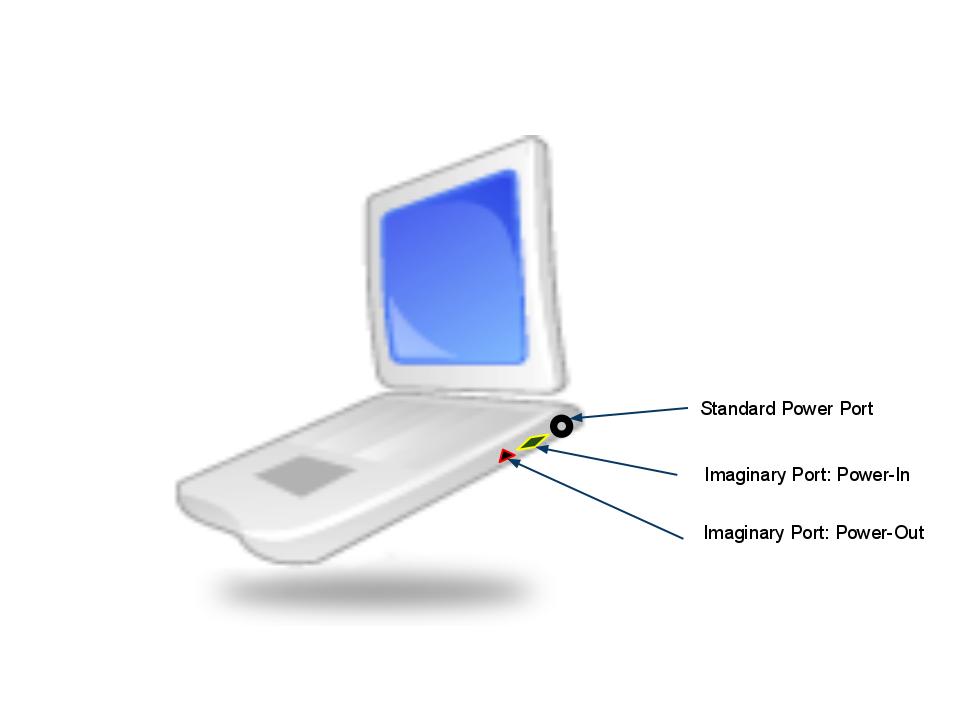
As I was thinking through this problem the other day, I had an idea. What if your laptop could draw power from another laptop? What if we had a cable that could draw power from one laptop and transmit the same into another?

For instance, if Dell is running out of power, it can connect to HP and draw power:
HP (Donor/Power-Out) -> Cable -> Dell (Receiver/Power-In)


Note: The above images are used purely for representational purposes. 

Each laptop should contain a Power-In, and a Power-Out port. The laptop that transmits power, would be called a Donor, and the one that needs power, will be called a Receiver. The imaginary cable that we're talking about, will have two unique pins on it's either ends to fit into the corresponding Power-In, or Power-Out ports, depending on the situation.Now that we've created some science-fictional characters, I'm going to name the imaginary Power-In and Power-Out ports as Universal Power Source (UPS) ports, and the imaginary cable, as UPS cord.

Doesn't that sound interesting?

Imaginatively Yours,
G U R U
Enhanced by Zemanta

Lock, Unlock, Remote-Start And Monitor Your Car Using Mobile Phone

Key-Less Entry: Current Trend
There are several gadgets that exploit the power of radio signals. One such gadget is the mini plastic fob, which houses a key-less entry system, used in automobiles. A key-less entry system is a brilliant innovation, which has always caught my imagination. Over the last few years, there has been a considerable amount of advancement in the field of key-less entry systems. For instance, car manufacturers such as Nissan, BMW and Ford have been rolling out car models, equipped with a smart keys. Check out this wiki link to see how a smart key works.
Though key-less entry is a neat innovation, there is definitely scope for more value additions; all of which, can be implemented by making a simple change to the hardware. The change would be to remove the plastic fob from the picture, and replace it with a mobile phone. Take a closer look at the pictures below, and you'll understand what I mean.

Proposed Innovation
Figure A depicts today's technology. Figure B, is tomorrow's technology (imaginary)- the concept will still be the same. i.e, there will be a radio signal transmitter, and a receiver, which will enable the driver to lock or unlock the vehicle remotely. However, the plastic fob that transmits the radio signals to the vehicle, should be replaced by a mobile phone. Can a mobile phone function as a key-less entry device? Why not? When it can take pictures, record and playback songs and video in HD quality, tune in to FM, communicate with fellow-devices via Infrared and Bluetooth, can't it broadcast radio signals to a car's receiver? If mobile phones were capable of doing that, auto makers can get rid of the additional piece of hardware (plastic fob) they ship along with every smart key, and cut down on the associated costs. Automobile manufacturers would be able to leverage on a hardware that a customer already has - a mobile phone. However, the auto-makers would have to come up with a software or a mobile app, which can be installed on a customer's mobile phone. This app should directly interact with the mobile phone's hardware, so it can communicate with the vehicle's receiver. Given the pace with which the mobile phone operating systems such as Android, iOS, Symbian and RIM have been growing, it shouldn't be a big deal. I know, it's easier said than done. But, the goal of this blog is just that - say something that doesn't exist, so someone gives it a thought and actually does it!

Further Enhancements & Value Additions
Replacing the plastic fob with a mobile phone, would pave the way for a host of innovations. However, all of them would have to be backed by an appropriate software, authorized by the vehicle manufacturer. The following are some useful innovations that I can think of.
Use Your Mobile Phone As a Remote Monitoring Device
A GPS enabled mobile phone records the places and the stoppage times of a vehicle, every time it is locked or unlocked. The recorded information is then emailed to the desired id, or stored in an authenticated web-cloud, which can be easily accessed later. The notification times and interval can be preset on the mobile phone itself. If your teenage daughter takes your car out for a Saturday night party, this information can be used to track your vehicle down. Google Latitude already incorporates a tracking feature, but it is more real-time. It cannot show the history of stoppages. Moreover, if your daughter switches off the mobile phone, there is no way you can track your car down.

Remote-Start Your Car, Using Your Mobile Phone
Including a remote-starter in the software would be a nice-to have feature. Unlike the conventional remote-starters that can operate only over a range, this one would enable you to even start your car from another country! Wouldn’t that be cool? How would it work? Maybe via an in-built GPS receiver in your car, which could be controlled from an authenticated- GPS-enabled mobile phone, or perhaps even via the web? If the ignition system of your car can be activated by a GPS signal, can we ask for anything better? Speaking of remote-starters, the advantage of using a remote-starter is that you don’t have to be dressed AT  

ALL, to start your car *grin*!

Voice-Activated Control, Via Mobile Phone
Let’s add more zeal to the above innovation. How about incorporating a voice-controlled feature to complement the remote-starter? You press a button on your phone, and say, “Accord babe, get started now. I’ll join you in another 5 minutes”, or say something like, “BMW, start now, and turn off, after 15 mins”. All the snow would melt, and you’d still be watching the soccer match, without having moved an inch!

Get Streaming Video of Your Car on Your Mobile Phone, 24/7

With Google Street View, one can literally see the images of streets. Why not write an Android or iOS app, which can harness this technology to actually capture the movement of your car in real-time, and transmit ? Let’s say your car gets stolen, and is currently being driven in I-84E, close to Exit 17. What if you were able to see your car and also the culprit who’s driving it? Think about it!


Your Mobile Phone Is Your All-In-One Remote Control
Would you embrace the idea of having a do-it-all remote? Apart from using it as a key-less entry device, a remote-starter, and a remote monitoring device, how convenient would it be to use your mobile phone to control your car’s audio system?   

Well, I can go on and on. But, I’d like to stop here. If you have more to add, please feel free to chime in!   


Imaginatively Yours,
G U R U
Enhanced by Zemanta

Find Lost Remote Control Using Your TV

We can have an effective conversation, only if we have a two-way communication. This is not just applicable to humans, but also to machines. Imagine a phone, or even a one-way intercom for that matter, which only lets you speak, but not listen. Does it make any sense in having such a device?


There are a whole bunch of appliances and gadgets in this world that still employ a one-way communication; by communication, I don't necessarily mean the interaction between two humans sitting on either ends of a telephone line, or a video-conference. One-way communication is also applicable to gadgets that work with a remote control, such as Televisions, Air-Conditioners, etc. The interaction between a TV and it's remote control is a one-way communication, because the TV receives the signals from the remote control, and responds accordingly. However, there is no signal that goes back to the remote control, from the TV - the main idea behind this post, is to harness this untapped idea. 

Before 1950, a remote control did not even exist. It then took 60 years for the remote control technology to evolve to it's present day state. Personally, I feel a LOT of innovation could have gone into this wonderful device, over the past years. The following para outlines one of my many ideas on remote control innovation. I'm reserving the others, for a couple of new posts *grin*.


Scenario
You know that your little ones were playing with your TV remote in the evening, but you were too busy to hide it away from them. It's dinner time now, and you're almost settled on your couch with a bowl of spaghetti, to watch your favourite TV show, Everybody Loves Raymond. Unfortunately, the TV is playing a different channel, and you're unable to change it because the remote is missing. You search frantically. You're either too lazy to walk towards the TV to manually change the channel, or ignorant of the fact that TVs can also be operated with human fingers. After a fifteen minute search, you finally find the remote lying under your own couch.

Solution

To solve the problem narrated in the above scenario, it'd be nice if Television makers employed a two-way communication technique here. What if your TV could talk to your remote? How about having a dedicated remote control locator button on your TV, and a mini built-in speaker in the remote control itself? On pressing the dedicated button, the TV would send the same Infrared signal back to the remote, activating an alarm. Essentially, your remote would ring, letting you track down it's location easily. We could probably also have some customizable ring tones (and ring volume adjustments!) on the remote control *grin*. If you think Infrared doesn't have enough range to pierce through cushions and walls, we always have the Bluetooth technology to save us! Click this link to know the difference between infrared and Bluetooth.

Value Addition      
Another nice-to-have feature in a remote control would be a rechargeable Lithium-Ion battery, replacing the conventional AA/AAA cells. The Lithium-Ion battery is lighter, and can be easily recharged several times; in fact, Television makers who provide such a feature, can also embed a battery charging port, along with the other input and output ports in the TV.


Well, how do you like these ideas?                    


Imaginatively Yours,
G U R U

LED Indicators on Input and Output Ports, in Laptops

Speaking of laptops, we've seen thousands of innovations going into their making, every other day. Almost all of the innovations are pretty good, I should say. Some of the noteworthy innovations are; reduction in the overall weight, varying screen sizes, customizable colors, rotatable screen, tablet-cum-keyboard design, back-lit keypad, touch enabled multimedia keys, HD screen with LED back-light, HDMI out, and a countless list of other neat value additions. Thanks to Apple, Sony, Lenovo, Dell, HP and Toshiba, for consistently competing with each other without which, such innovations wouldn't have been delivered to mankind in a reasonable amount of time.

Speaking of innovation in laptops, here's an idea that spiked through my mind last night, while I was watching the hollywood flick, The Expendables. My son woke up with a start, when Jason started firing at the South American goons, from the tip of a fighter plane. It then took an hour for me to put him back to sleep. Before I resumed watching, I decided to grab my Bose headphones. Hunting down my headphones in the darkness wasn't as big a challenge as plugging it's pin into my Asus laptop's headphone jack. I didn't turn the lights on, as I didn't want to wake my son up again. After several failed attempts in finding the headphone jack, I finally reached out to my Nokia E71x, and used it's flashlight to complete my mission! Thanks to Nokia's OVI Store, I was able to download the flashlight app, last week. However, I wonder why Nokia (and others) doesn't embed a flashlight in all of it's cell phones - doesn't it qualify to be a default feature? How expensive is it to plug in an LED at the top?

Apologies for digressing from the main topic. Here's the actual idea that occured to me last night: Why not have an LED-backlight on the input/output ports of a laptop, such as the headphone and microphone jacks, USB/HDMI ports? Most of the laptops do have colorful, mini LEDs right next to the network ports and CD/DVD drives. Though these LEDs are not intended for helping the users locate the ports when it's dark, they do guide the users to a certain extent. My idea is something very similar to this - incorporate color-coded LEDs right next to the input/output ports in a laptop. For instance, a dark red LED next to a microphone jack, would help users to plug in the mic pin into the appropriate port. Likewise, a dark green LED for the headphones port, and say, an orange LED for the USB port. All of these should glow steadily, so they're easily distinguishable from a blinking green or an orange light, which  normally indicates the status of a network port or a CD/DVD drive.

Infact, having a steady back-lit LED on the ports itself (taking the shape of the ports), would be a perfect innovation. What do you think? 

Imaginatively Yours, 
G U R U


Access Your Address Book From A Friend's Phone

Imagine a scenario where you're at your friend's place, and you forgot to carry your mobile. You need to urgently get in touch with a distant relative of yours, to seek an information. You don't know his or her number. What would you do? If I were you, first I'd either call my parents, or a common relative, provided I remember their phone numbers by heart. If neither of them are able to help me out, I'd certainly be floating in a hot soup.


Now that I narrated the scenario, let me also narrate a figment of my imagination to solve such a problem.


How nice would it be if I were able to access my personal address book stored in my own cell phone, from any other cell phone? If such a service existed, I wouldn't even mind paying a small fee to the cell phone service providers. 


The idea is simple. There needs to be a global contacts cloud, which any cell phone service provider across the globe would be able to easily access. Every single cell phone in the world would have a unique user id (could be the cell phone number itself) and password to logon to the cloud. By cloud, I don't mean a storage area accessed via internet. The storage area that I'm talking about could be exclusive to the actual cell phone networks. Coming back, since every single cell phone across the globe would be able to access it's designated storage areas on the network cloud, there would be no problem for an Airtel-user (from India) in accessing his address book from an AT&T-user's (In the US) cell phone. The only caveat is that all cell phone providers across the globe should have some sort of a mutual agreement to have a stake on the cloud. Well, it's easier said than done, but do you get the idea? 


Take a look at the following image, for more clarity. 


Imaginatively Yours,
G U R U

5 Things You Can Do, By Phoning Up Your WordPress Blog

No kidding! You can now phone your blog and say much more than  just a Hello! WordPress has launched a fantastic feature wherein you can post an audio file to your blog, directly from any phone. 


Click here to read the official announcement by Matt, from WordPress.
This feature is so down-to-earth, that even an earthworm can use it! All you'd have to do is, Enable the Post by Voice feature, under My Blogs. Upon clicking the Enable button, a US phone number would be displayed, along with a passcode. Make a note of this phone number and memorize the passcode. DO NOT write down your passcode anywhere, since anyone can misuse your blog if they get hold of the phone number and the passcode - don't let your tech blog transform into a phone sex blog. Well, that was just a word of caution!
Coming back, this is where you'll find the Post by Voice feature in WordPress, under your Global Dashboard:


The following are some of the cool things you could do, using the Post by Voice feature:

Create Audio Podcasts

pic_podcast_463_full  Use any phone (US only) to dial your blog and post an audio podcast. The audio file will be posted to your blog instantly, after you hang-up. The audio quality of the podcast, however would depend on the surrounding environment. Make sure you speak from a quiet place - not from the fish market.

Relay Press Meetings

press release Dump those long and heavy microphones. Use your cell phone instead. Dial your wordpress blog, and simply let the politician directly talk to your blog! After you disconnect the call, the audio clip will be directly posted to your blog. You'd    be the first person to have relayed the press meet across the globe! Now, how cool is that?

Host Interviews

interview The next time you want to publish an interview in your blog, consider this - call the person with whom  you've fixed up an appointment for the interview. Let   him or her know that you're going to conference one  more person, who'd be a silent spectator, and who'd only be listening to the conversation. The silent  spectator would be none other than your WordPress blog - it'd be recording the interview in the background via the teleconference, and would instantly post the interview in your blog, as soon as the call is  disconnected.  To cut it short, you don't have to move your butt an inch.

Instantly Publicize

 RSS PublicizeThanks to social media for making the process of word-of-mouth-marketing, completely electronic. You could make use of all the social Networking tools such as Twitter, Facebook, StumbleUpon, etc. (read, and a hundred others) to instantly publicize the conversation you've had with your blog. I don't want to get into the details of  how to use social media to promote your blog, as there are thousands of other sites that give you that advice for free. However, let me give you a random one. Click this. Speaking of publicity, let's not forget the faithful RSS (Not sure what RSS is? Watch the videohere), which would instantly syndicate your new audio post to all your loyal readers.

Build A Private Database

 private databaseAre you in the habit of making notes frequently? Forgot to carry your pen or scribbling pad, or both? Why not try this method - use your cell phone or land line instead of your pen. Yes, you guessed it right. simply dial your blog and start speaking out your notes. At the end of the one-side conversation, your verbal notes would have got posted into your WordPress blog. You could even build your own private database of verbal notes, by making your WordPress blog private (Click here to know how to do it, in case you're not sure). Use your USB pen drive to download the audio files from your private database, later. By doing so, you also have a back-up that you could carry along, which can be accessed even without an internet connection!


Now, what are you waiting for? Lift your handset and start talking to your WordPress blog!
Enhanced by Zemanta